The Problem

AI budgets are growing. The proof that it’s working is not.

AI spend is rising, but the business impact remains hard to see. Leaders need to know where AI is improving work — and where the value is actually showing up.

01 AI Spend Accountability

"What did our AI spend buy — and how would we know?"

  • AI invoices arrive sorted by tool and by seat — $42,000 last month — while the work happened in tickets, repos, projects, and roles.
  • Finance sees a bill, and the department sees the activity. Neither view ties to the other.
  • Nobody can connect the spend to a clear unit of work or a business outcome.
  • There's no way to join the two — the invoice and the activity stay two separate stories.
02 Capacity Mix & Priority

"How much of our capacity goes to transformation, versus keeping the lights on?"

  • Leaders set priorities, but week to week the work drifts to whoever shouts loudest.
  • AI frees up time, but without tracking it quietly flows back into Run instead of the Transform agenda — Transform is running 12 points under plan.
  • Grow is running 8 points over plan, and Run 4 points over — the mix is moving, but not on purpose.
  • Nobody can see the shift happening until it already happened.
03 Decision Confidence

"If priorities changed tomorrow, what could we redirect without adding risk?"

  • Without a full picture of people cost, AI spend, and actual work, it's hard to change course.
  • It's unclear which workstreams are over-invested, or what AI is really doing on each one.
  • Run holds 48% of capacity, Grow 34%, Transform 18% — nobody can say which of it could move.
  • If it moved, Transform could reach 26% — but nothing proves that capacity is safe to redirect.
02 The Full Picture

Every paid hour and every AI dollar lands somewhere. We make that visible.

See where time and spend go — across teams, projects, and roles.

Run

Keeping the lights on.

62% actual 58% plan
+4
points vs plan

Grow

Scaling what already works.

28% actual 32% plan
−4
points vs plan

Transform

Building what's next.

10% actual 14% plan
−4
points vs plan
AI frees time in Run and Grow. CIOptimize shows where that time actually went, and lets you redirect it into Transform.
What You Get Back

One system, four outputs every leader cares about.

One platform, four clear outputs: Cost, Output, Reallocation, and Business Impact — no new tools or timesheets.

Cost

People and AI spend on the same unit of work — project, team, role, or service.

Output

Plan versus reality every week, and cost per ticket, story point, or campaign.

Reallocation

Where freed capacity went, and the moves you can approve to redirect it.

Business Impact

Initiatives rolled up to the revenue, margin, cost, or risk the board tracks.

Technology Leadership

The CIO or Head of IT

“Where is my capacity going, and is the mix moving?”

CostOutputReallocation
  • Sees total Cost and Output by Run, Grow and Transform
  • Spots where AI has freed capacity, and whether it was Reallocated to the right work
  • Connects major initiatives to Business Impact, not just delivery dates

Catches capacity AI frees up before it is silently absorbed.

Delivery & Strategy

The Head of PMO or IT Strategy

“Are we on the right priorities, and can I show it?”

OutputReallocationBusiness Impact
  • Tracks Output per project or program against the plan, week by week
  • Sees where Reallocation decisions were made and what they enabled
  • Uses Business Impact to defend and adjust the portfolio

Confirmed actuals arrive from Slack or Teams — no timesheets to chase.

Finance

The CFO or FP&A

“What did the money buy, across every team?”

CostReallocationBusiness Impact
  • Sees combined Cost — people plus AI — for every unit of work
  • Understands how Reallocation changed the spend mix over time
  • Reads Business Impact in terms of revenue, margin, cost, or risk

No separate AI bill to reconcile against headcount.

Four outputs, one source of truth — so technology and finance stop arguing over different numbers.

Product in Action

Where insight turns into action.

See how CI Optimize brings capacity, priorities, and execution together so teams can make informed decisions and move work forward seamlessly.

What We're Building

Six things the platform actually does.

Plan vs. reality, every week

Output per ticket, story point, or campaign month — with cost per unit trending over time. No timesheets, no reconciliation.

  • Output tracked per ticket, story point, or campaign month, with cost per unit trending over time.
  • No timesheets, no reconciliation — actuals confirm themselves against the plan.
  • Every Friday, the drift is explained and recommended moves are drafted for approval.
See it on the platform

Find and move people, by asking

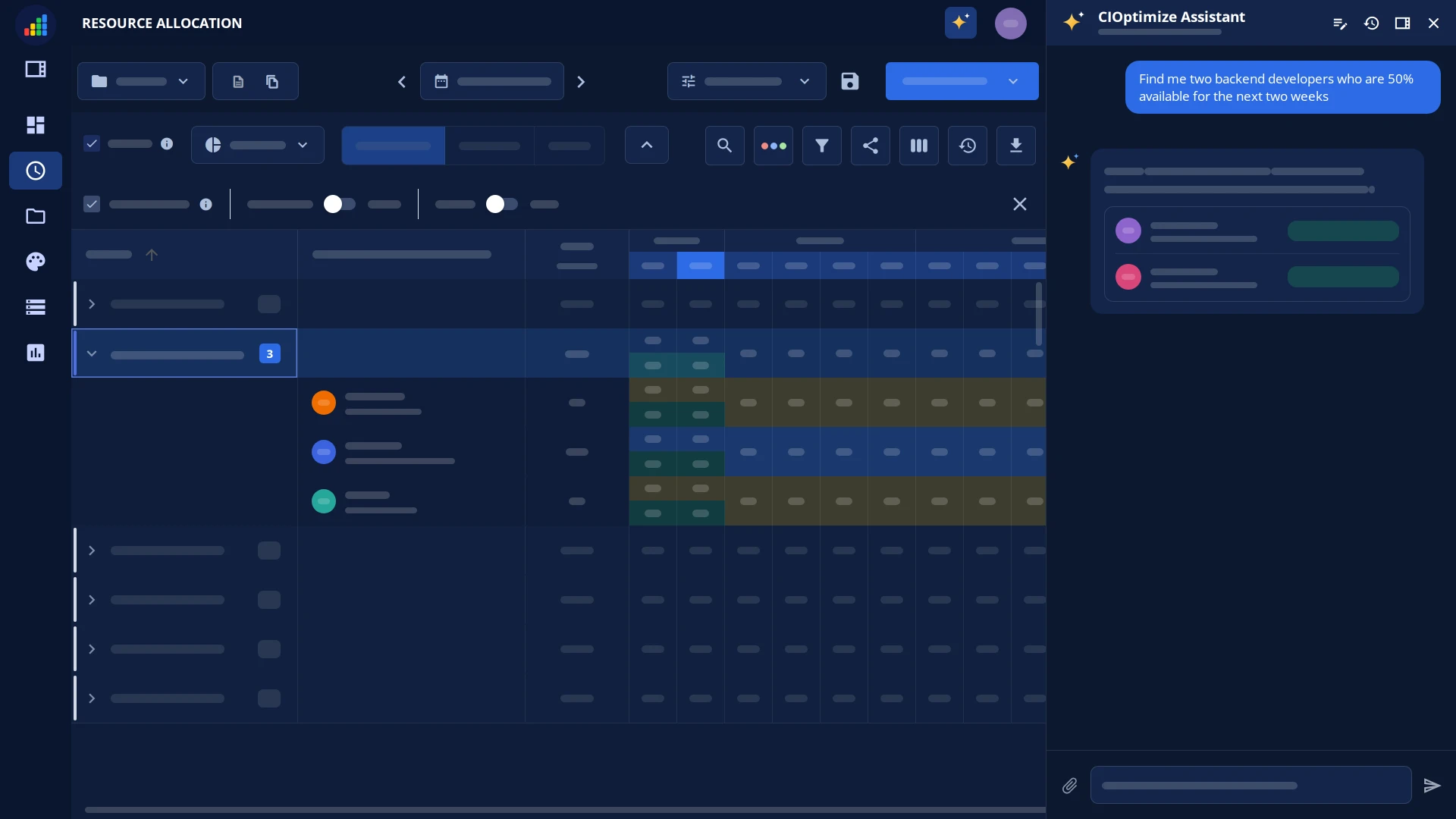
Role fit, availability, and fractions — the assistant drafts the reallocation, you approve it. Changes write to the plan only on approval.

  • Ask in plain language for role fit, availability, or a fractional allocation.
  • The assistant drafts the reallocation — nothing changes until you approve it.
  • Changes write to the plan only on approval, never silently.
See it on the platform

Every project's cost, people and AI together

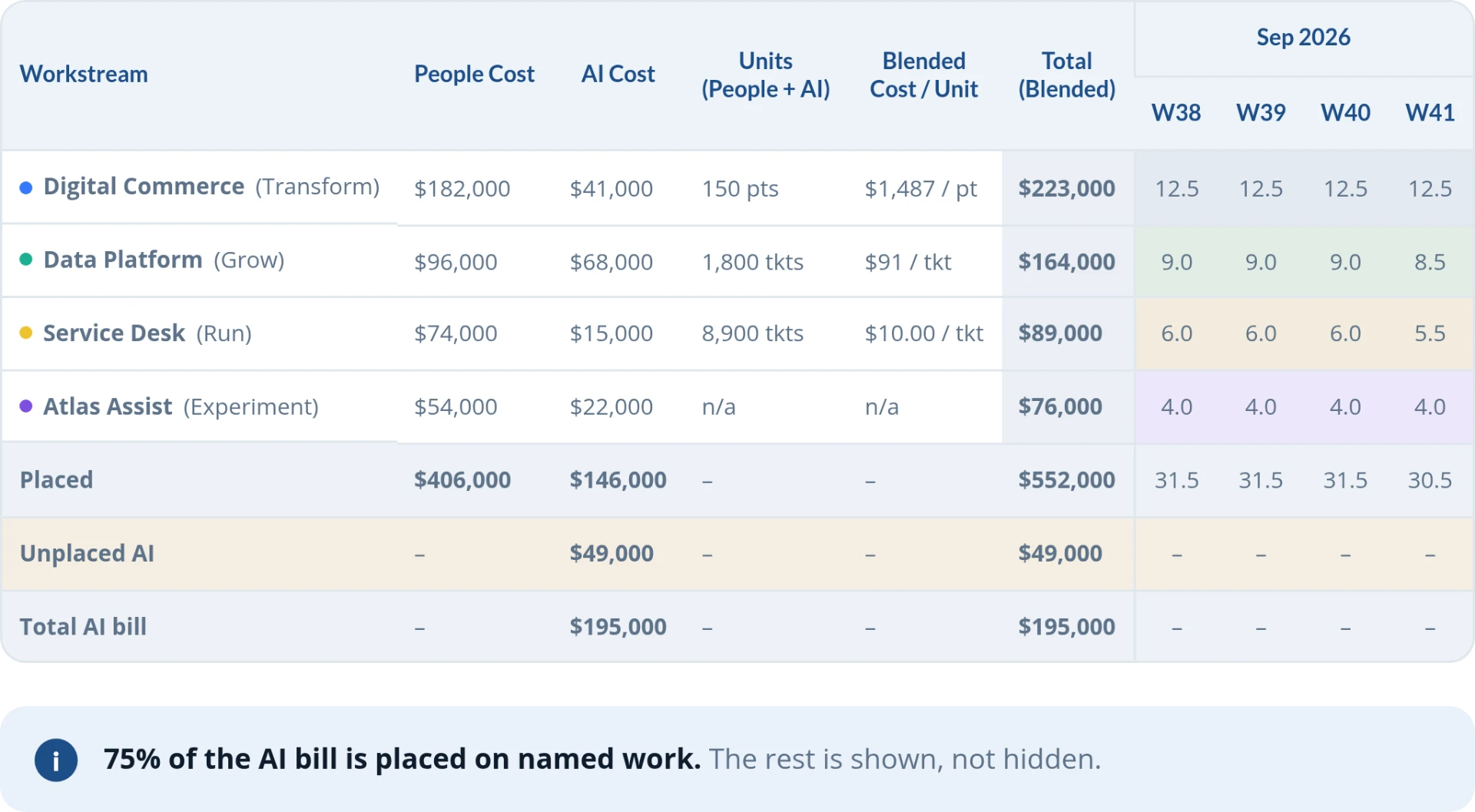
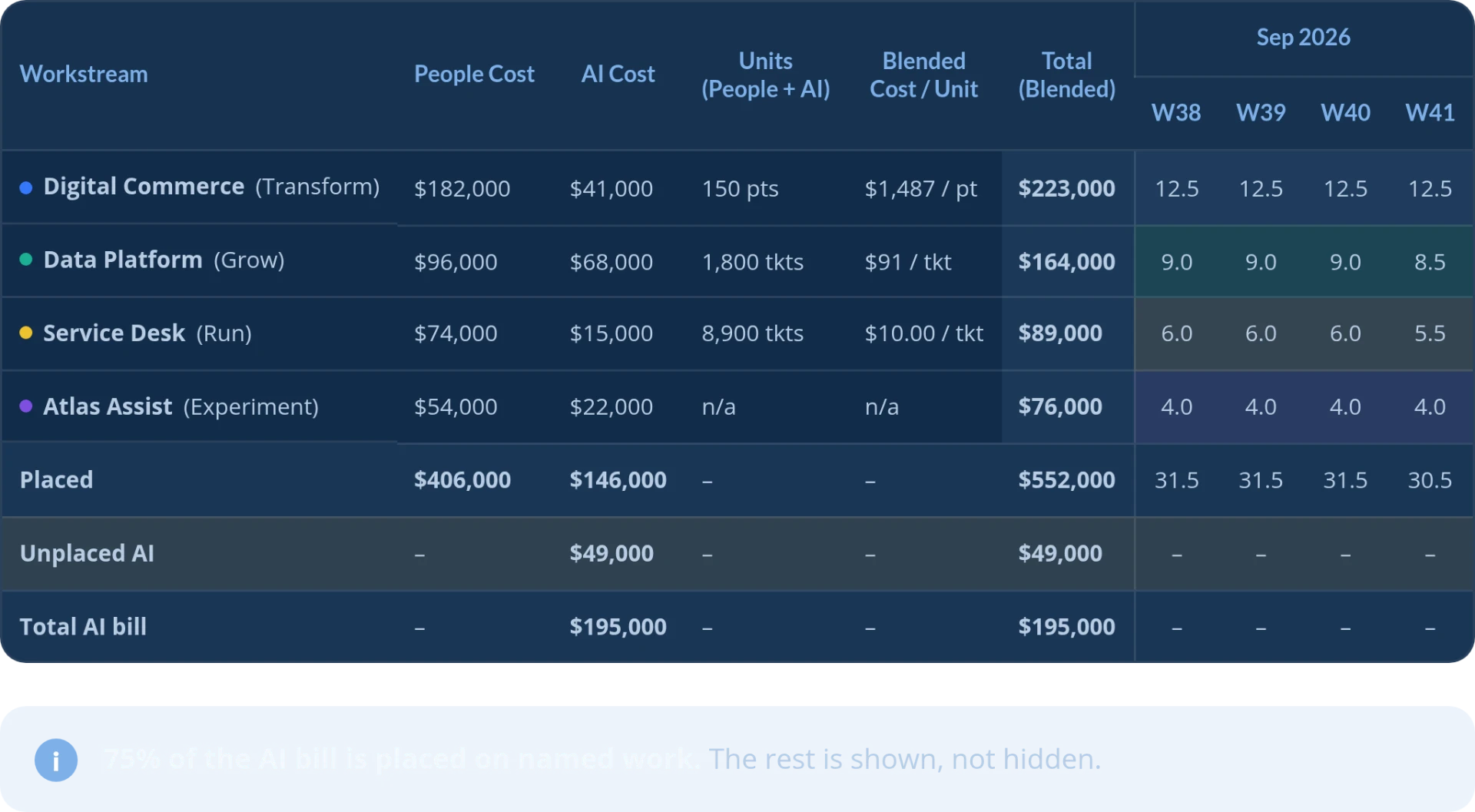
AI invoices are broken down by workstream, project, team, and role, so the AI line sits next to the people cost it works with.

  • AI invoices are broken down by workstream, project, team, and role.
  • The AI line sits next to the people cost it supports — not a separate bill.
  • The project cost view is live today; the AI breakdown is a designed view.
See it on the platform

Objectives & key results tied to the plan

Objectives stay linked to the work that funds them, tracked over time against a declared baseline.

  • Objectives stay linked to the work that funds them.
  • Baselines are declared once, at the start of the fiscal year.
  • Progress tracks over time against that baseline, not just reconstructed at quarter close.
See it on the platform

Where every paid hour lands

Run, Grow and Transform — or your own buckets — leave and admin included, so the capacity picture is honest.

  • Every paid hour lands in Run, Grow or Transform — or the buckets your team names instead.
  • Leave and admin time are counted too, so the picture reflects real capacity.
  • The mix updates every week, not just at quarter close.
See it on the platform

A slip moves the whole plan

A project delayed two weeks, or a person out for a week — everything downstream on the plan pushes out with it, and the impact is visible.

  • A project delayed two weeks pushes out everything downstream on the plan.
  • A person out for a week shifts everything on their plate the same way.
  • The impact is visible immediately — nobody re-threads dependencies by hand.
See it on the platform
Getting Started

Start with one department, for four weeks.

Monday

Plan against what happened

Last week's plan against actuals — by person, by project, and AI spend against its plan. Move people, adjust fractions, or raise a project's AI budget where it earns it.

Tuesday – Thursday

Work lands on the right project

Tickets, repos and AI usage attach themselves to the work they belong to. Nobody enters anything by hand.

One nudge

Confirm, in Slack or Teams

Here is what you were allocated; here is what the systems say you touched. Confirm or correct in a minute. Unplanned work gets a comment, and that comment becomes data.

Friday

The drift, explained

Which projects ran over on people, which on AI, and what it did to the mix. Recommended moves are drafted and written to the plan only when someone with access approves them.

Each week

Reallocation in one place

Freed capacity is captured and redirected on purpose — not absorbed into Run. New projects get a drafted staffing plan, and goals link to the plan when projects start or change.
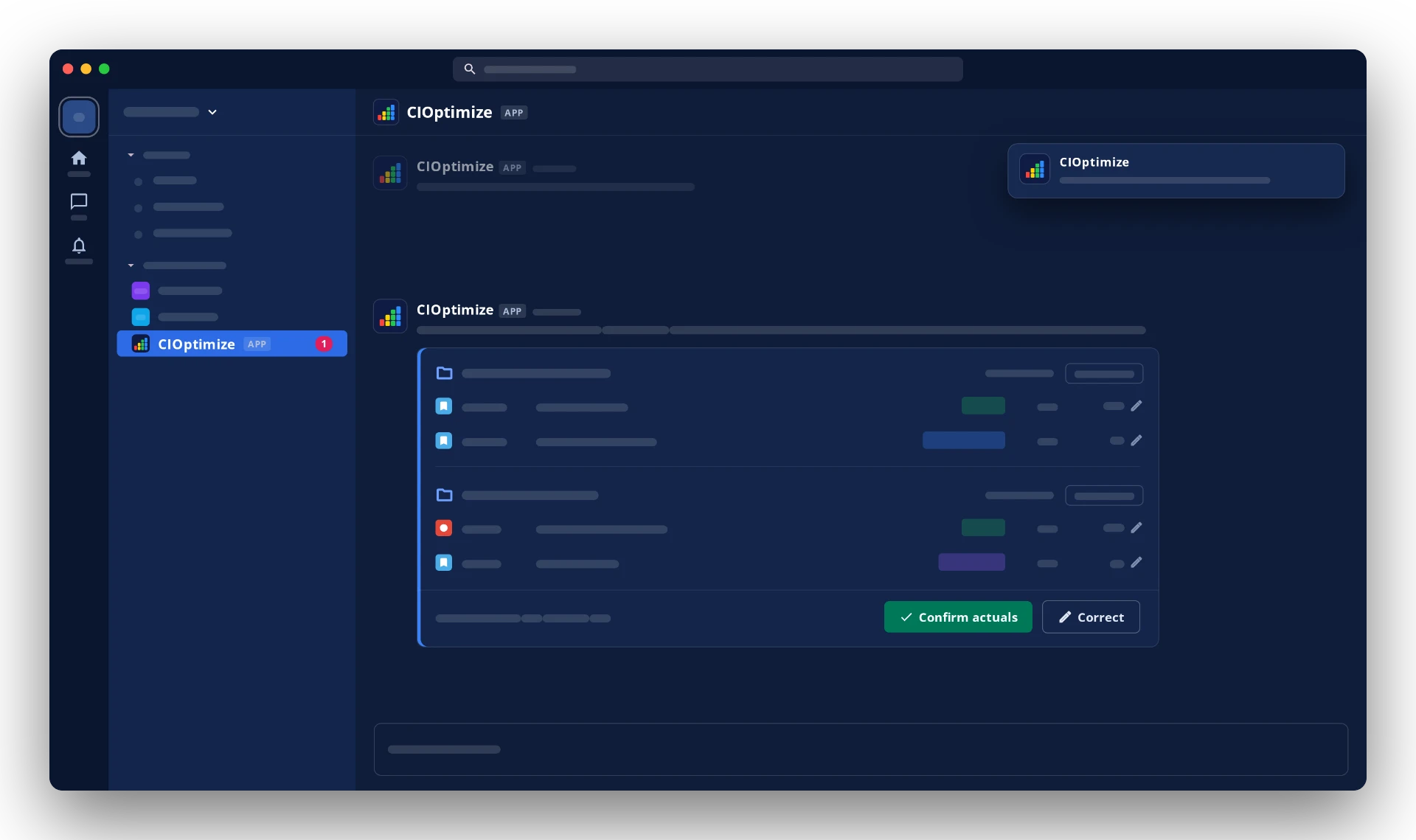
No new tools for teams. No timesheets. People confirm their week directly inside tools they already use, like Microsoft Teams or Slack — there's no goal-setting project to begin, and no new system for anyone to learn. Cost is present from day one: rates come from HR level and location, so nobody enters one.
For Larger Organizations

The questions a bigger rollout always raises.

"Can this run in our own environment?"

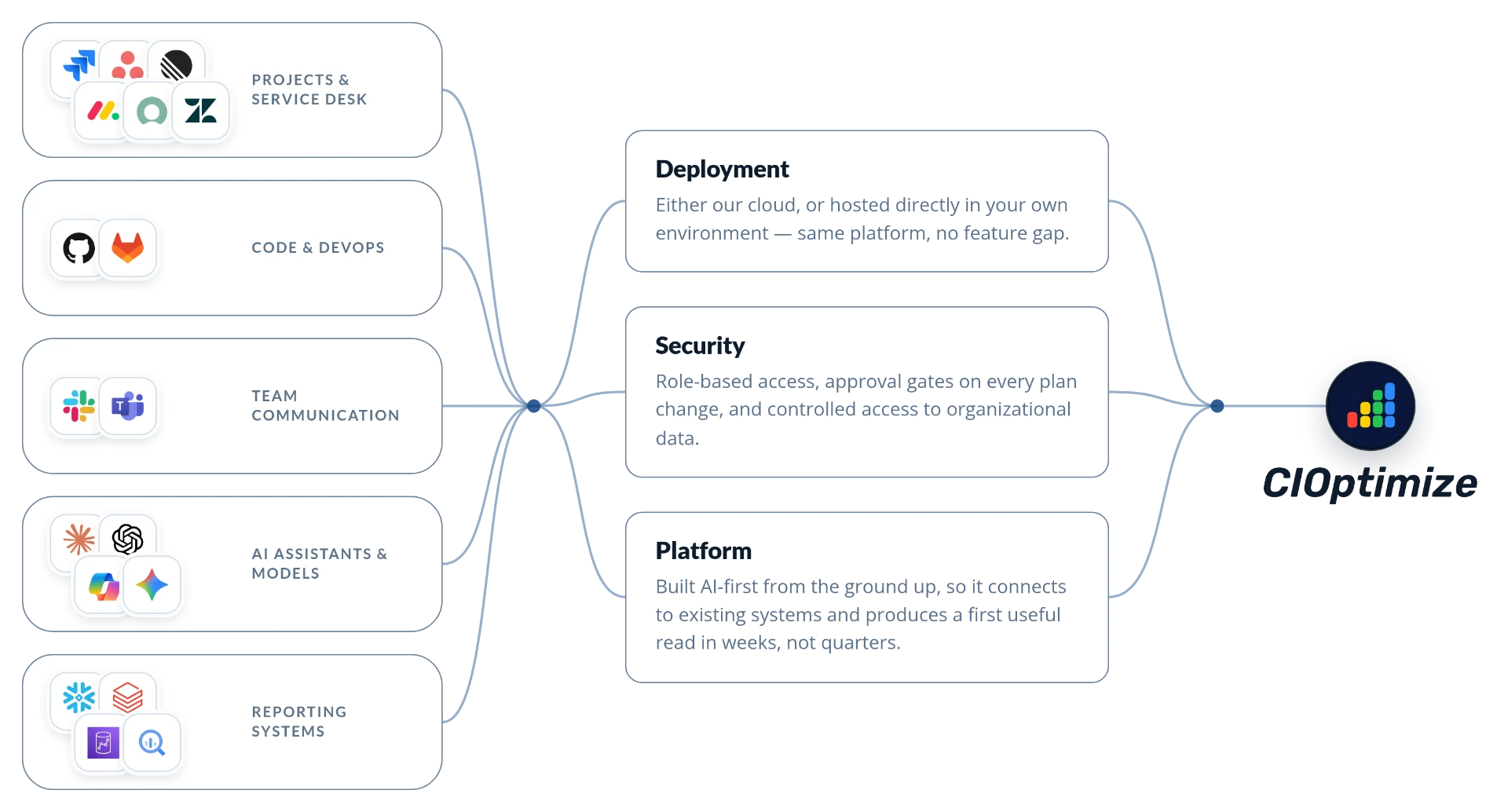
  • Cloud or self-hosted — your choice, not a forced path
  • Same platform either way — no feature gap between the two
  • Sits alongside Jira, GitHub, Slack and Teams — it doesn't ask you to replace them

"Who can see and change what?"

  • Role-based access control across the platform
  • Nothing writes to the plan until someone with the right access approves it
  • Controlled access to organizational data — not open by default

"Will it fit what we already run?"

  • Six integrations live today: Jira, Jira Service Management, GitHub, Slack, Microsoft Teams, and Claude (MCP)
  • HR, identity and AI billing sources connect next
  • People confirm their week inside Slack or Teams — nothing new to learn

"How long until this is actually useful?"

  • Built AI-first from the ground up — fast to set up, not a year-long rollout
  • No timesheets or goal-setting required to start — an analytics-only start is enough
  • Rates come from HR level and location automatically — cost is present from day one
Platform & Security

Security built in, not bolted on.

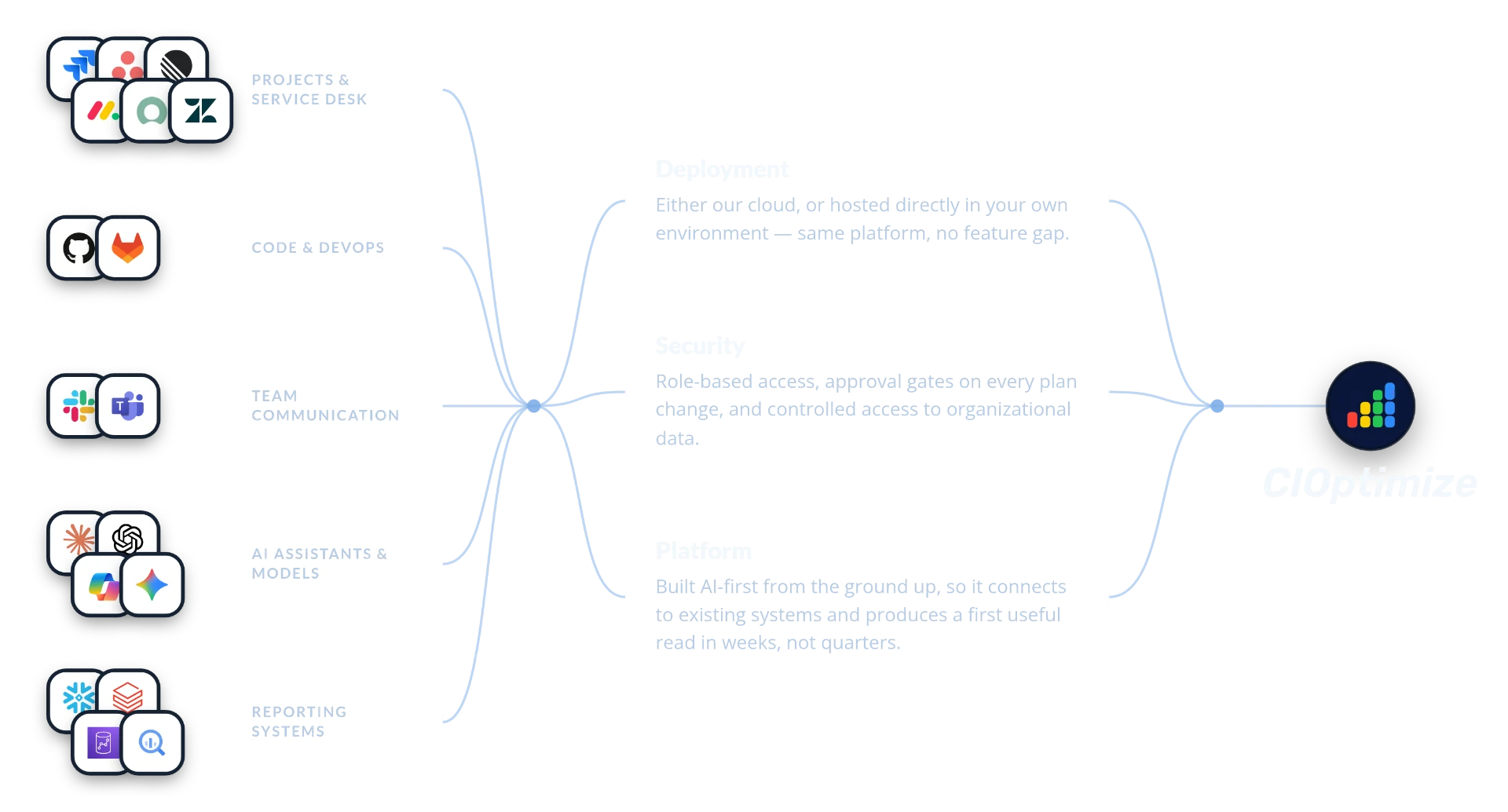
CIOptimize integrations: project and service desk tools, code and DevOps tools, team communication tools, and AI assistants flow through Deployment, Security and Platform into CIOptimize.
AI in Action

AI does not save money. Reallocation saves money.

01

What the Agent Actually Takes Off the Plate

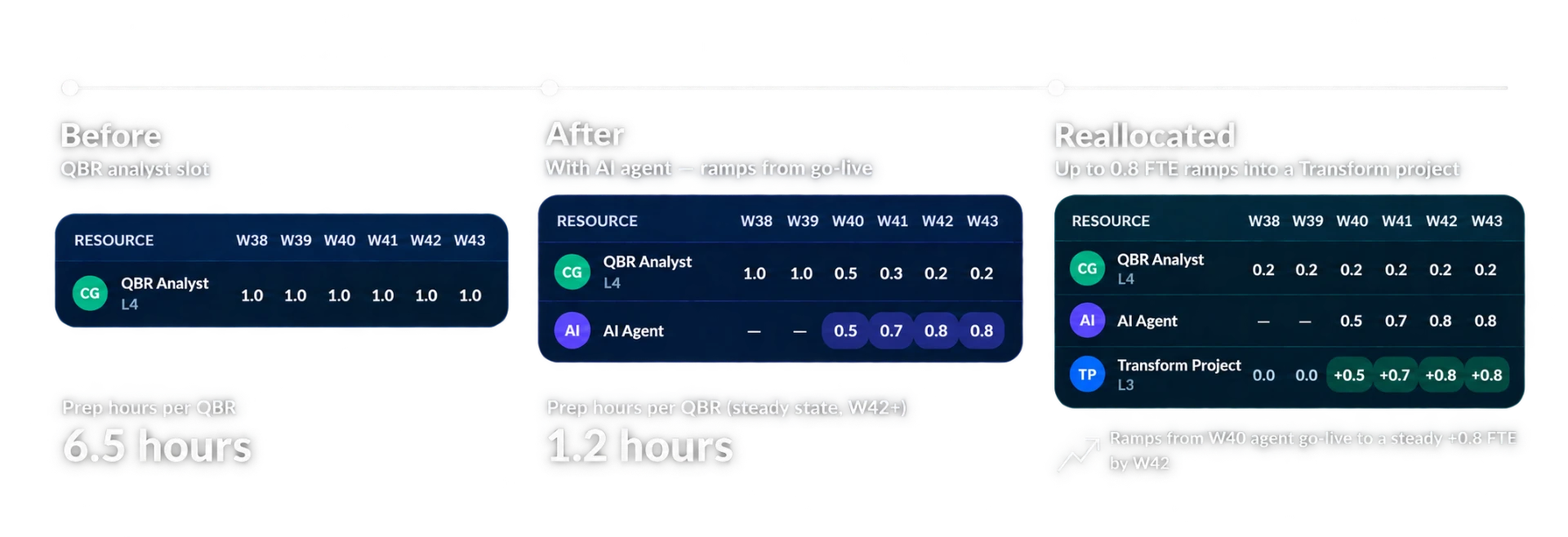
It ramps into QBR prep and cuts it from 6.5 hours to 1.2 — freeing 0.8 FTE that goes straight into a Transform project, not idle capacity.
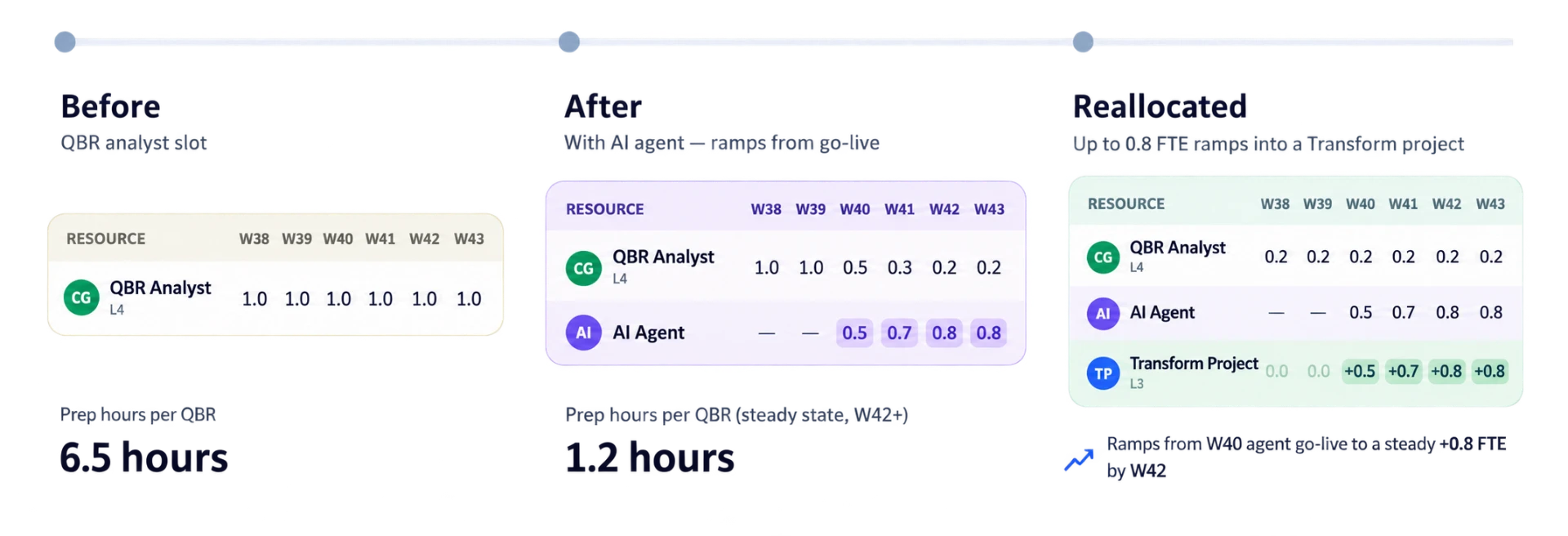
AI agent QBR preparation, reallocation before and after
02

AI That Reaches Out First

Flags under- or over-allocated projects, AI workstreams that went red, and places where AI freed time that hasn't been reassigned yet.
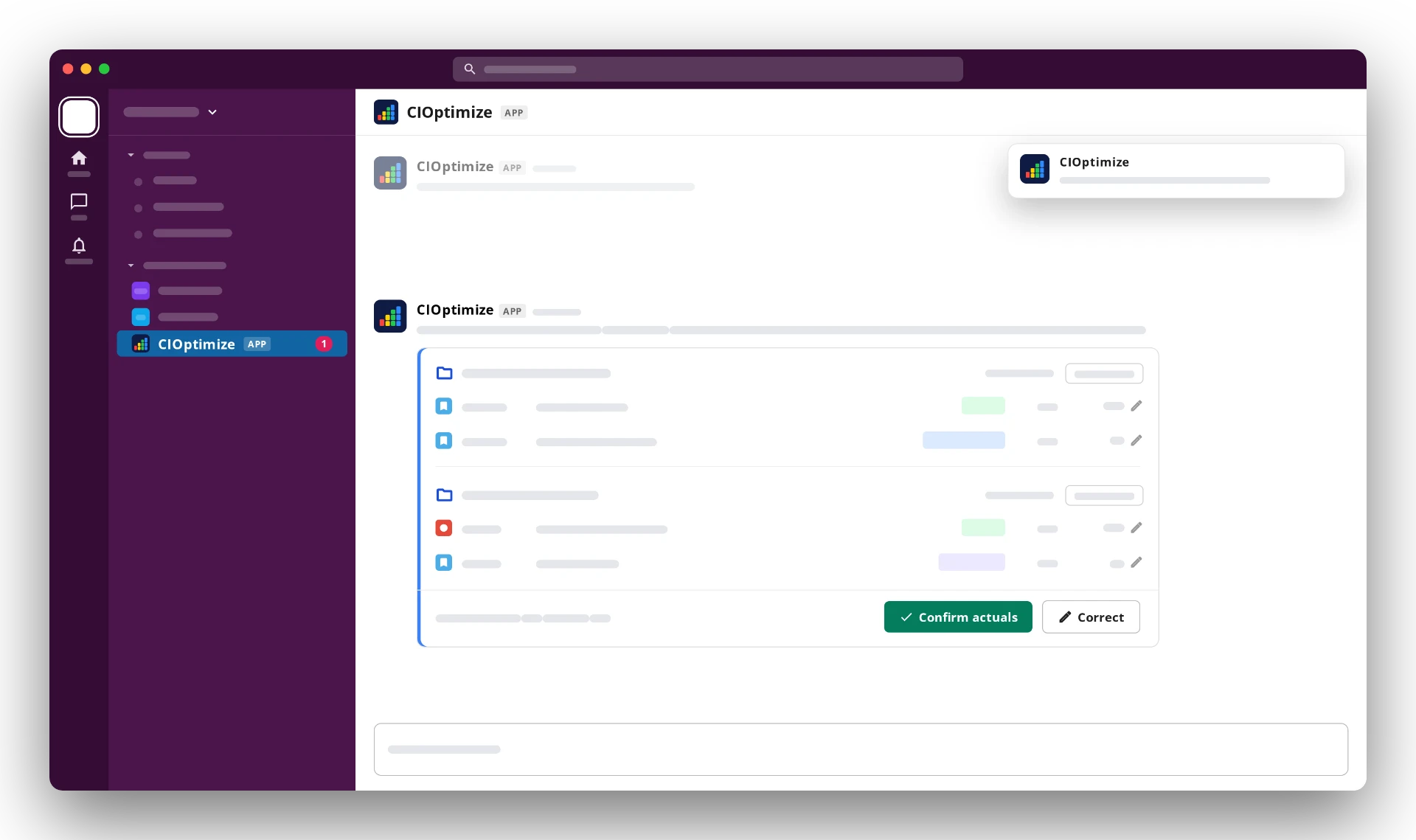
CIOptimize reaches out in Slack
03

AI-Native

Ask for a reallocation plan — which people and which AI budgets can shift — and approve the changes in one place. Nothing is written until someone with the right access approves it.
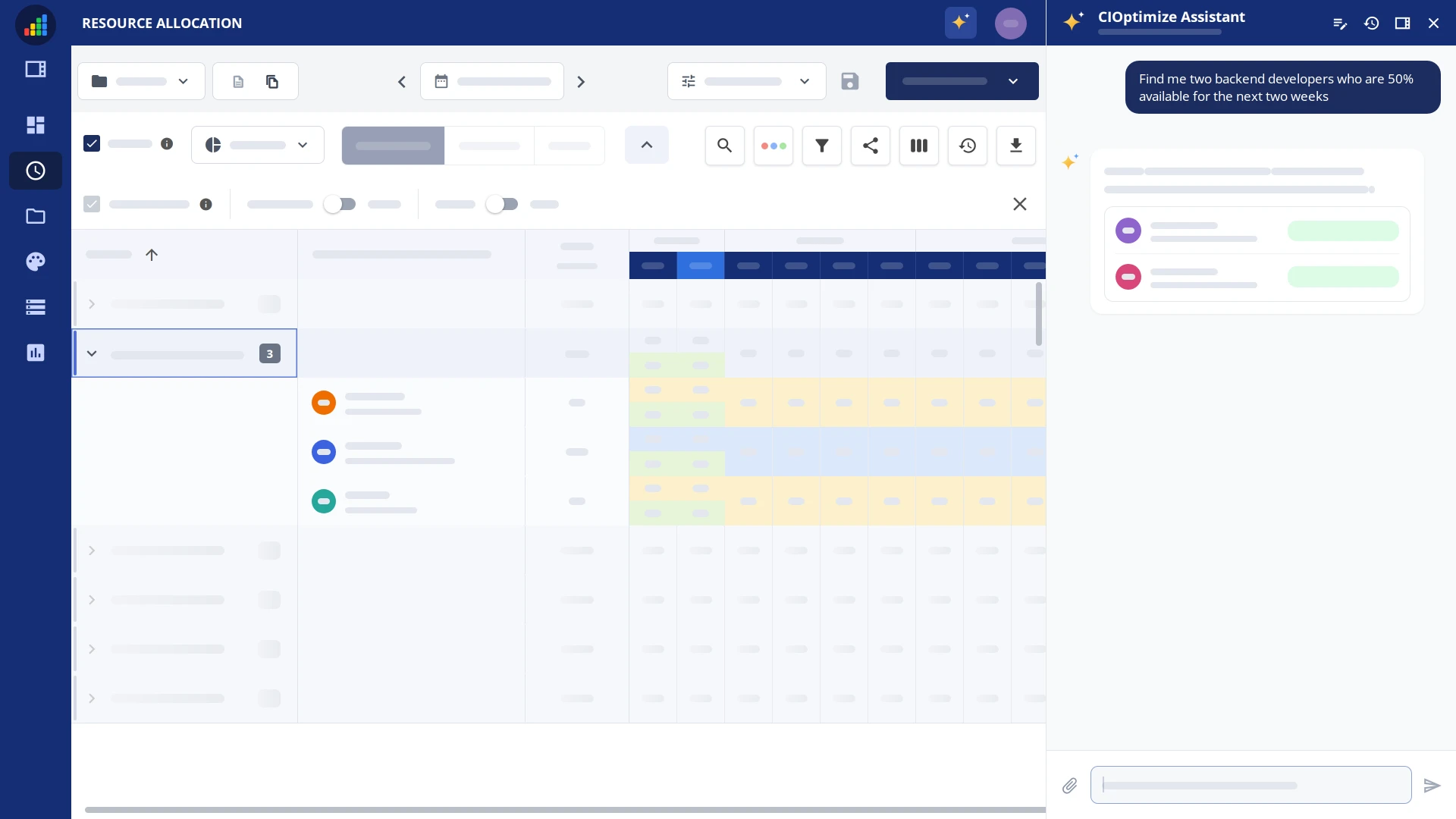
CIOptimize assistant in resource allocation
04

Insights That Arrive Already Built

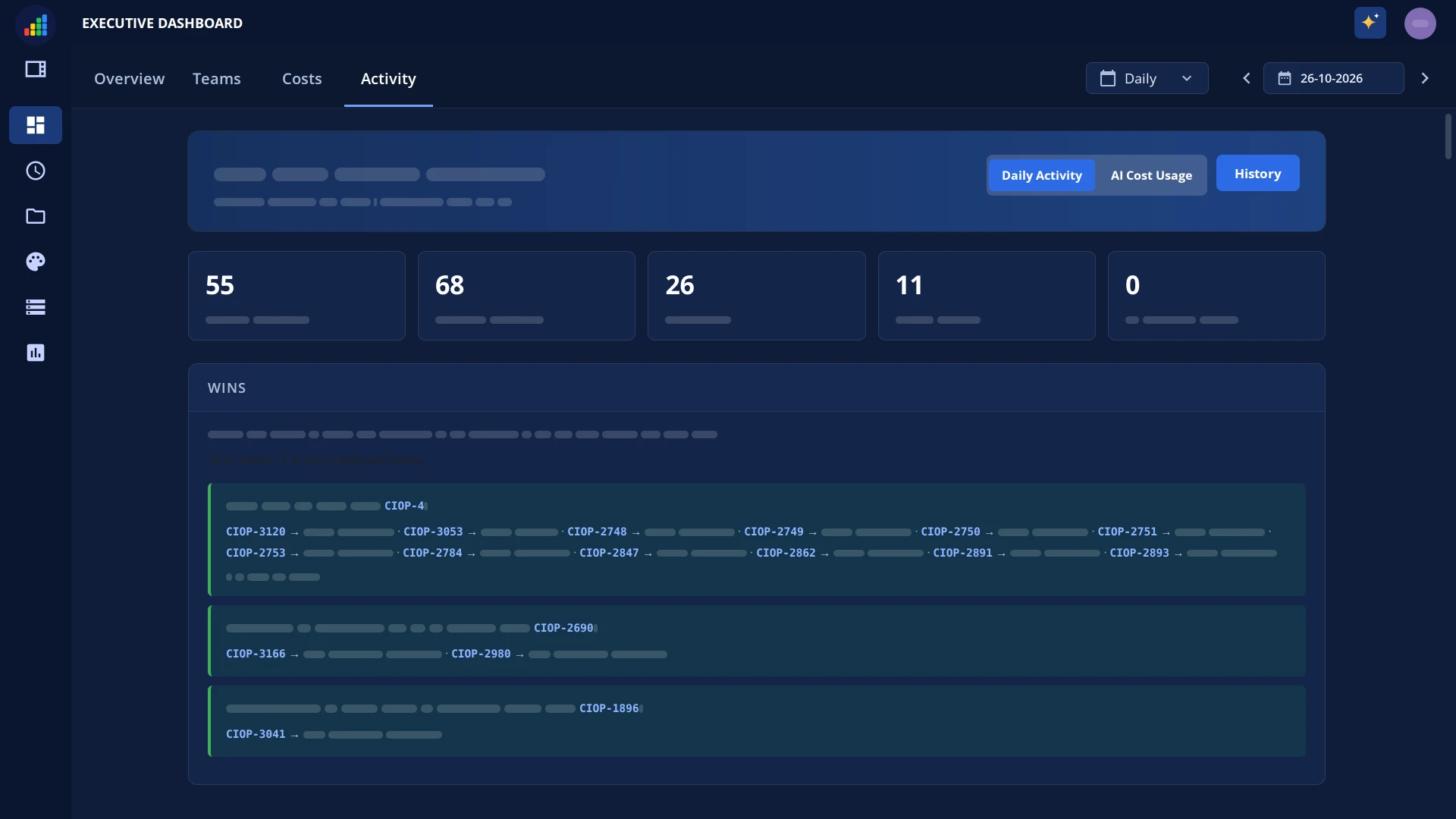
Every week you get pre-built views of how allocation shifted and what it did to cost, output, and impact. Nothing to configure, nothing to schedule.
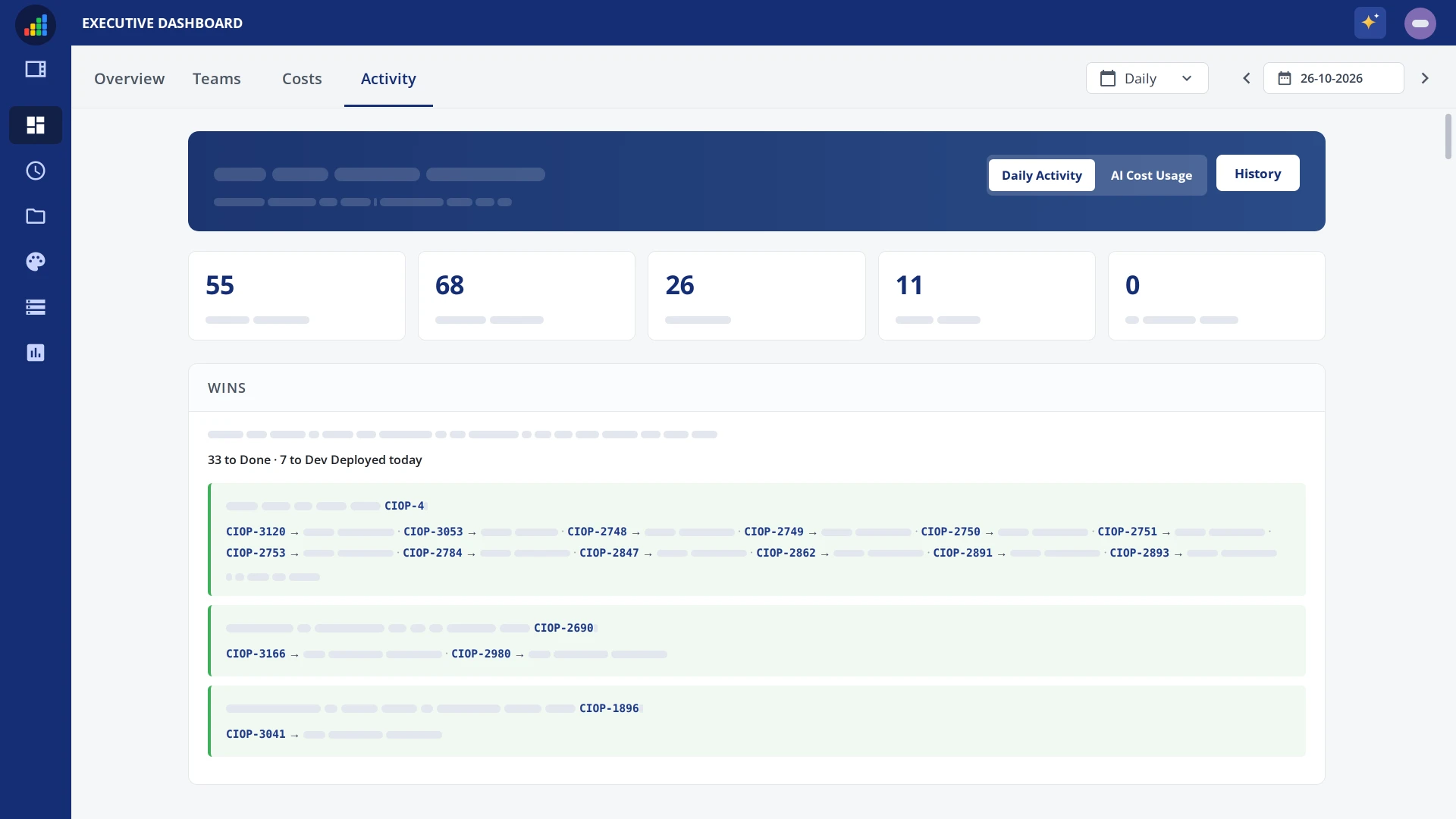

CIOptimize executive dashboard reports
Why We Built This

Built by people who lived this problem.

Chet Gandhi, co-founder of CIOptimize
Our Story

We kept getting the same question from CIO, PMO, and CFO — what did the work cost, people and AI together, and what did it return? Existing tools showed tasks, or AI bills, or static budgets. None of them connected cost, output, allocation, and business impact in one place.

CIOptimize is the execution layer between strategy and delivery: every paid hour and every AI dollar, read against the plan every week. A short video on why we built it, and how it works, is on the way — for now, here's where it'll live.

Frequently Asked Questions

Straight answers.

Where do the AI benefits show up in your platform?

In four places, and they are all visible on the same screen: Cost (people and AI on the same unit of work), Output (plan versus reality, and cost per unit), Reallocation (where freed capacity went and what you can move next), and Business Impact (initiatives rolled up to the metrics your board tracks).

Do you claim hours saved?

No. Hours-saved arithmetic is easy to game and hard to trust. We track where the freed capacity actually went — reassigned, absorbed into Run, or unallocated — and we leave the value of that capacity to you to judge.

Do we have to start everywhere at once?

No. We recommend one department, four weeks. Pick a single department, connect its sources, and answer one question: where did people cost and AI spend go, what did we get back, and what would we change next month?

What does early access actually include?

The weekly plan-versus-actual rhythm, confirmed actuals in Slack or Teams, and the project cost view — with more designed views arriving on the roadmap above.

How is this different from an AI spend dashboard?

A spend dashboard shows the invoice, sorted by tool and seat. This puts that spend on the work it supported, next to the people cost, and then shows what changed when you moved it.

How is this different from project management software?

Project management tools track tasks. CIOptimize tracks what those tasks cost — in people and in AI — against the plan, automatically.

Does the AI reach out on its own, or only when asked?

Both. It flags under- or over-allocated projects and AI workstreams that went red before you think to look, and you can also ask it anything directly, in the app, in Slack or Teams, or from your own assistant.

Do we need goals or timesheets defined to start?

No. It is an analytics-only start, and the service desk view needs no goal vocabulary at all. Rates come from HR level and location, so cost is present from day one.

Book a Demo

See where your AI and people cost actually went — and what you got back.

Prefer email? contact@cioptimize.com